

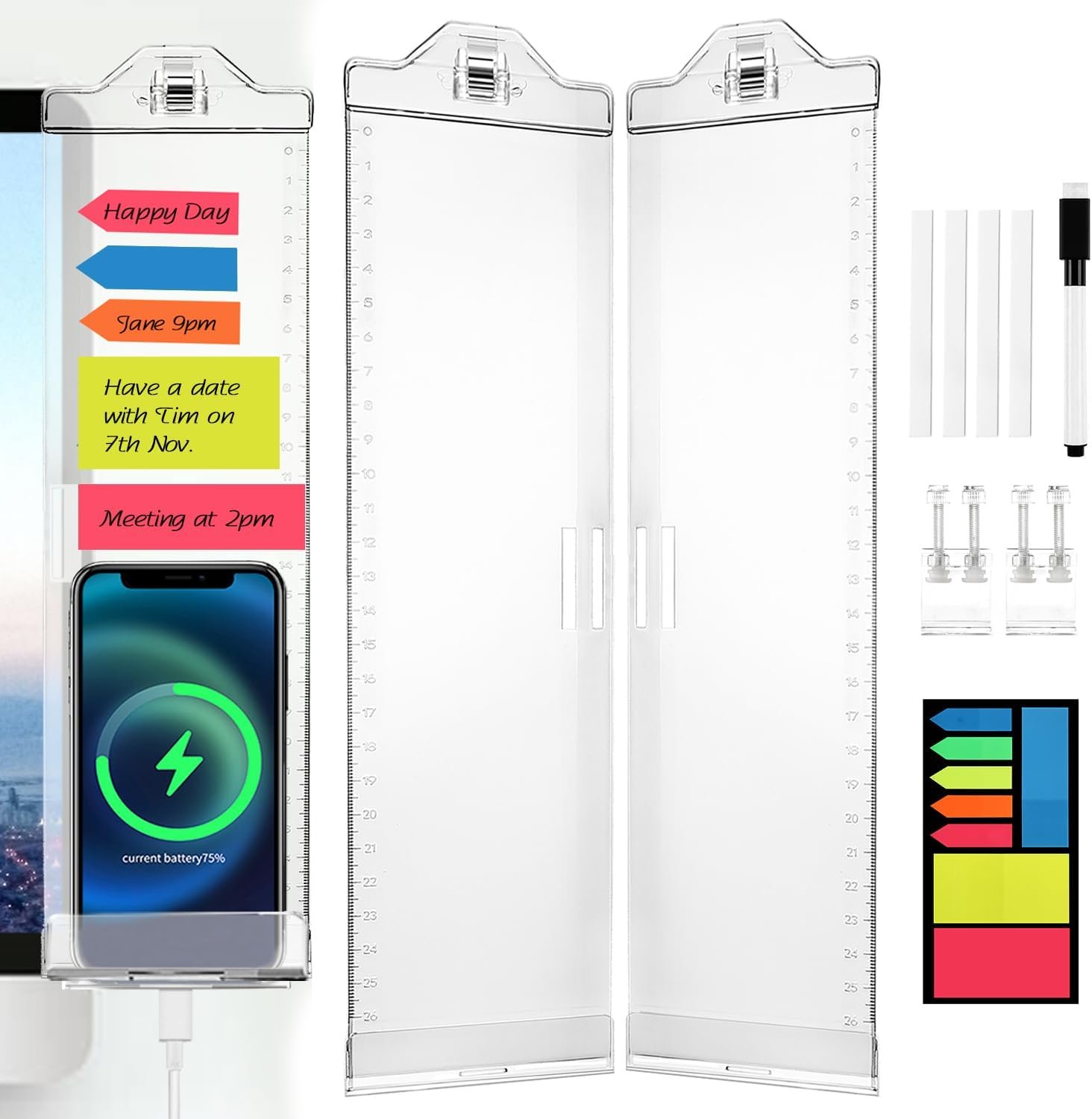
Monitor Memo Boards for Computer, Whole Transparent 2 Pack (Left & Right) Multifunction Acrylic Screen Message Reminder Pad Side Panel Phone Holder Organizer for Office Desktop, with Pen & Sticky Note
OSPNIEEK has been dedicated to manufacturing quality monitor memo pads for about 8 years. By surveying customers’ feedback, we have improved the shortcomings of the classic version of the memo board and introduced an upgraded version of the memo board, removing the black edges and realizing full transparency. And there are two types of installation, clip install and sticky install, both of which are firm, the clip install can be easily removed and leaves no traces without the risk of damaging the monitor.
Let OSPNIEEK Message Boards 2.0 help you be more Efficient and Do Better at work, live a more Regular life, and say goodbye to forgetting things habit!
[Specification]: —Package Include: 1x Left & 1x Right Whole Transparent Memo Board, 1 Pack Sticky Notes, 1 Marker Pen, 2 Clips, 4 Adhesive tapes
—Size: 12.36″L × 3.2″W × 0.8″H (31.4cm×8cm×2cm)
—Material: Premium Quality Acrylic
—Color: Whole Transparent
Why choose OSPNIEEK Memo Boards 2.0?
1. Authentical Premium Quality Acrylic, more durable and More textured.
2. Whole Transparent, avoid obscuring the content of the narrow screen.
3. Exquisite craftsmanship, smooth, no burrs.
4. Two installing methods, clamp install, stable and can avoid damaging the monitor screen.
5. The board has a scale on it and can be used as a ruler.
6. The top clip can clamp 0.5inch thick paper, and the bottom has holes for charging while supporting your phone.
[Super Easy to Install & Two Installing Ways]: –Clamp Install (No adhesive required):
1. Insert the attached clip into the hole of the board;
2. Snap it onto the edge of the monitor;
3. Tighten the screws of clip to install the board well.
-Adhesive Install:
1. Apply double-sided tape to the edges of the memo board.
2. Remove the film from the double-sided tape on the board.
3. Stick the board securely to the edge of the monitor.
You can also refer to the included instructions for installation.
You can stick some sticky notes on the screen managed auxiliary board, you can also hold important non-stick papers, or even hold a mobile phone or some small things, such as movie tickets, photos and personal business cards etc. There is also a charging hole (1.18×0.20 inch (3.0×0.5cm)) under the phone holder, which can easily charge your phone while ensuring that your data cable can pass through the hole. You could stick memo boards on pc screen side, refrigerator side or house corner etc.
[24-hours and Friendly Service]: —If you have any problem, please tell us and we would help you solve it until you’re satisfied.
[Fully Transparent Upgrade Design]: The whole memo board is fully transparent, which can avoid blocking the content of the screen display, even the narrow screen. Allows you to install the screen acrylic board and still maintain normal reading of the entire screen. Paste them on both sides of the computer, and paste notes, you can record some important things, and let you never forget what you want to do
[Excellent Material]: Our screen message reminder panel is made of High-quality Acrylic, more durable and wear-resistant. Experiment shows that it can withstand things up to 700g (25 oz) for long time. The premium acrylic ensures OSPNIEEK’s memo panel is highly transparent and even a little shiny
[Super Practical]: Three areas, the upper area with a strong paper clip, can clip documents, the middle part can be pasted with notes, and the bottom can put your mobile phone, even design with a hole for convenient charging of your mobile phone. Use OSPNIEEK monitor memo boards, paste notes to be convenient to remind yourself to do things, record your work arrangements, meeting reminders and as your great daily notes
[No Adhesive to Install & Two Ways to Install]: First way- just insert the attached clip into the hole of the board, then put it on the edge of the monitor, then tighten the screws of clip to install the board well. Use first way you needn’t use adhesive to install, it can avoid damaging the computer screen or avoid residual adhesive marks when removing the adhesive. Second way- Use attached double-sided tape to paste memo boards on both sides of the edge of the computer display screen. Use second way you can stick memo boards on pc screen side, desk side, refrigerator side or house corner etc. You can also refer to the included instructions for installation
[Great Gift]: Packaged in a beautiful box, can be a perfect gift for your friends, kids and families. Comes with the bright colored & polygonal post-it notes and a marker pen to help to remind you more eye-catchingly, and you can use the attached maker pen to write anything on acrylic boards and you can use the attached erasers of maker to easily erase
$8.99
OSPNIEEK has been dedicated to manufacturing quality monitor memo pads for about 8 years. By surveying customers’ feedback, we have improved the shortcomings of the classic version of the memo board and introduced an upgraded version of the memo board, removing the black edges and realizing full transparency. And there are two types of installation, clip install and sticky install, both of which are firm, the clip install can be easily removed and leaves no traces without the risk of damaging the monitor.
Let OSPNIEEK Message Boards 2.0 help you be more Efficient and Do Better at work, live a more Regular life, and say goodbye to forgetting things habit!
[Specification]: —Package Include: 1x Left & 1x Right Whole Transparent Memo Board, 1 Pack Sticky Notes, 1 Marker Pen, 2 Clips, 4 Adhesive tapes
—Size: 12.36″L × 3.2″W × 0.8″H (31.4cm×8cm×2cm)
—Material: Premium Quality Acrylic
—Color: Whole Transparent
Why choose OSPNIEEK Memo Boards 2.0?
1. Authentical Premium Quality Acrylic, more durable and More textured.
2. Whole Transparent, avoid obscuring the content of the narrow screen.
3. Exquisite craftsmanship, smooth, no burrs.
4. Two installing methods, clamp install, stable and can avoid damaging the monitor screen.
5. The board has a scale on it and can be used as a ruler.
6. The top clip can clamp 0.5inch thick paper, and the bottom has holes for charging while supporting your phone.
[Super Easy to Install & Two Installing Ways]: –Clamp Install (No adhesive required):
1. Insert the attached clip into the hole of the board;
2. Snap it onto the edge of the monitor;
3. Tighten the screws of clip to install the board well.
-Adhesive Install:
1. Apply double-sided tape to the edges of the memo board.
2. Remove the film from the double-sided tape on the board.
3. Stick the board securely to the edge of the monitor.
You can also refer to the included instructions for installation.
You can stick some sticky notes on the screen managed auxiliary board, you can also hold important non-stick papers, or even hold a mobile phone or some small things, such as movie tickets, photos and personal business cards etc. There is also a charging hole (1.18×0.20 inch (3.0×0.5cm)) under the phone holder, which can easily charge your phone while ensuring that your data cable can pass through the hole. You could stick memo boards on pc screen side, refrigerator side or house corner etc.
[24-hours and Friendly Service]: —If you have any problem, please tell us and we would help you solve it until you’re satisfied.
[Fully Transparent Upgrade Design]: The whole memo board is fully transparent, which can avoid blocking the content of the screen display, even the narrow screen. Allows you to install the screen acrylic board and still maintain normal reading of the entire screen. Paste them on both sides of the computer, and paste notes, you can record some important things, and let you never forget what you want to do
[Excellent Material]: Our screen message reminder panel is made of High-quality Acrylic, more durable and wear-resistant. Experiment shows that it can withstand things up to 700g (25 oz) for long time. The premium acrylic ensures OSPNIEEK’s memo panel is highly transparent and even a little shiny
[Super Practical]: Three areas, the upper area with a strong paper clip, can clip documents, the middle part can be pasted with notes, and the bottom can put your mobile phone, even design with a hole for convenient charging of your mobile phone. Use OSPNIEEK monitor memo boards, paste notes to be convenient to remind yourself to do things, record your work arrangements, meeting reminders and as your great daily notes
[No Adhesive to Install & Two Ways to Install]: First way- just insert the attached clip into the hole of the board, then put it on the edge of the monitor, then tighten the screws of clip to install the board well. Use first way you needn’t use adhesive to install, it can avoid damaging the computer screen or avoid residual adhesive marks when removing the adhesive. Second way- Use attached double-sided tape to paste memo boards on both sides of the edge of the computer display screen. Use second way you can stick memo boards on pc screen side, desk side, refrigerator side or house corner etc. You can also refer to the included instructions for installation
[Great Gift]: Packaged in a beautiful box, can be a perfect gift for your friends, kids and families. Comes with the bright colored & polygonal post-it notes and a marker pen to help to remind you more eye-catchingly, and you can use the attached maker pen to write anything on acrylic boards and you can use the attached erasers of maker to easily erase
Specification: Monitor Memo Boards for Computer, Whole Transparent 2 Pack (Left & Right) Multifunction Acrylic Screen Message Reminder Pad Side Panel Phone Holder Organizer for Office Desktop, with Pen & Sticky Note
|
10 reviews for Monitor Memo Boards for Computer, Whole Transparent 2 Pack (Left & Right) Multifunction Acrylic Screen Message Reminder Pad Side Panel Phone Holder Organizer for Office Desktop, with Pen & Sticky Note
Add a review
Related Products


![Lamicall Car Headrest Tablet Holder – [3 in 1 Extension Arm] Adjustable Tablet Car Mount for Back Seat, Gifts Road Trip Essentials for Kids, for 4.7-11″ Device Like iPad Pro, Air, Mini, Galaxy, Fire](https://m.media-amazon.com/images/I/71CkCu-9qlL._AC_SL1500_.jpg)

$8.99

Tessa Avalos –
You won’t be disappointed
Love this holds well and quality great stickiness needs a little more
Angela Robinson –
Monitor board’s
I bought 2,one for work. Sturdy and convenient
Teresa Styers –
Kinda fits
Doesn’t fit Dell computer screens
Random User –
Works well for the most part.
This 2 pack of transparent memo board is a pretty neat idea. This is a simple way to solve the mess and clutter that is present on most work monitors. The dreaded sticky notes on the side of monitors is a real phenomenon in the work environment. The memo boards do a good job of making the sticky notes much more pleasant to the eye. It can still look cluttered but in a controlled and systematic way. My favorite feature is the phone tray at the bottom because it has a small cutout for a charging cable to be inserted into the phone to charge it while in use. It’s great to be able to use my phone in portrait mode while I’m charging it. The only issue I have is the way it clamping mechanism. It works okay for monitors that have angular backs, but if it’s curved or tappers, then there’s going to be an issue. The back of my monitor tappers to the side with a slight curvature. This may cause the clamping mechanism to fail. There is the alternative of taping the board to the side of the monitor if the clamps aren’t working for your monitor, but I really don’t want to leave sticky residue on my monitor should I want to remove or reposition the boards. The product is good, but it just wasn’t the right fit for my monitor.
Virginia Williams –
As expected
Good product for my purpose.
Johana –
Didáctico
Muy práctico y útil para la oficina
Marybel Guzman –
NOT sturdy, don’t buy!
Do not buy. Fits poorly on a desktop computer screen. Not sturdy at all! Does NOT hold a phone’s weight. I missed my return window and couldn’t return it.
jiselle –
Great addition to my desk
Love the functionality, keeps my to dos organized, sticks to the monitor, and extremely easy to install. The look is sleek and not overwhelming
Avery –
I’ve been using these monitor memo boards to help me organize my thoughts, and I think they’re pretty nice for what they are. I personally haven’t been using them on my monitor (for reasons I’ve detailed below), but I have placed them on my wall instead and they work well there.Here’s what I like about these memo boards:-They look really clear-Comes with clear tape as well-Look just like the photos-Comes with a good dry erase marker (maybe wet erase, not really sure yet)-The sticky notes are vibrant-The ruler is accurate-Easy enough to installAnd here’s what I don’t like about them:-The double sided tape you really only get one good chance to stick it on-The clamps are way too short to work on many monitors.-There isn’t a place to store the spare sticky notes/pen.The largest complaint I have, is that the clamps just don’t work on the majority of monitors that I’ve tried. I have roughly 8 monitors in my house, and the clamp only worked on 1 of them. For the clamps to work, the back of the monitor needs to be completely flat, thinner than .75 inches (roughly 20mm), and not be angled in any way. In other words, if your monitor is thicker at the bottom, and thinner at the top, there’s a chance that it won’t work. I think that’s quite a few checkmarks to have before you can use the clamps.That said, I think there’s nothing wrong with the boards themselves, as long as you’re willing to tape to your monitors. I’m not really willing to (as the one I’m using is boarderless, so I’d have to tape directly to the screen) so these don’t really work for me. At $18 though I wouldn’t say that they’re a bad buy. If you want a way to organize your thoughts a little easier, I can definitely recommend these.
just me –
This set is neat and useful. Installation takes a little figuring out as the accompanying diagrams aren’t the greatest…but you can figure it out.Using the clamps, these are easy to install…though I wish each display panel had more than one section clamped down for greater stability. (The only clamp is in the middle of the panel. It would have been better if one was at the top and one at the bottom of the panel). I haven’t tried the adhesive tape method, though, so I’m not sure how stable that method would be on its own. (I suspect that using both methods at the same time might be a good idea).My monitors have extremely thin side edges (practically no edges), which is not ideal for these side displays. I have one clamped to my side of the monitor for now, but I’m not sure how long I’ll leave it there for. The annoying thing for me is that since my monitors don’t really have much of a side lip or border, the displays (while transparent) block the very side edge of my screen…which is annoying to me as when working with large Excel files, etc., I like to make as much use of the screen as possible…So even a centimeter along the edge being blocked is a hindrance.As for the monitor shelf piece…it comes with what I presume is tape already stuck to it. (There are no instructions on how to install that piece, presumably because it should be self-explanatory.) I haven’t tried it yet as I didn’t realize what that piece was for, at first…and I’d already tried clamping one of the side displays horizontally along the bottom of the monitor. I’ll see how that stays up first before seeing if I want to use the shelf piece…All-in-all, I think this is a good, innovative, and useful set…assuming that you have the “right” kind of monitor to stick or clamp these onto. I’m not sure how strong the clamps or tape are (so I wouldn’t necessarily try to stick anything heavy on the displays – the clamps don’t feel THAT strong)…but they’re certainly great for helping me to get the hundreds of post-it notes I have scattered on my desk off my desk!I like that each of the side displays has a clipboard clip at the top that you can clip small pieces of paper to…and also a small “shelf” at the bottom, where you can rest a pad of post-it notes or the dry-erase marker, etc…or your cell phone, I suppose (though I haven’t actually tried it).