

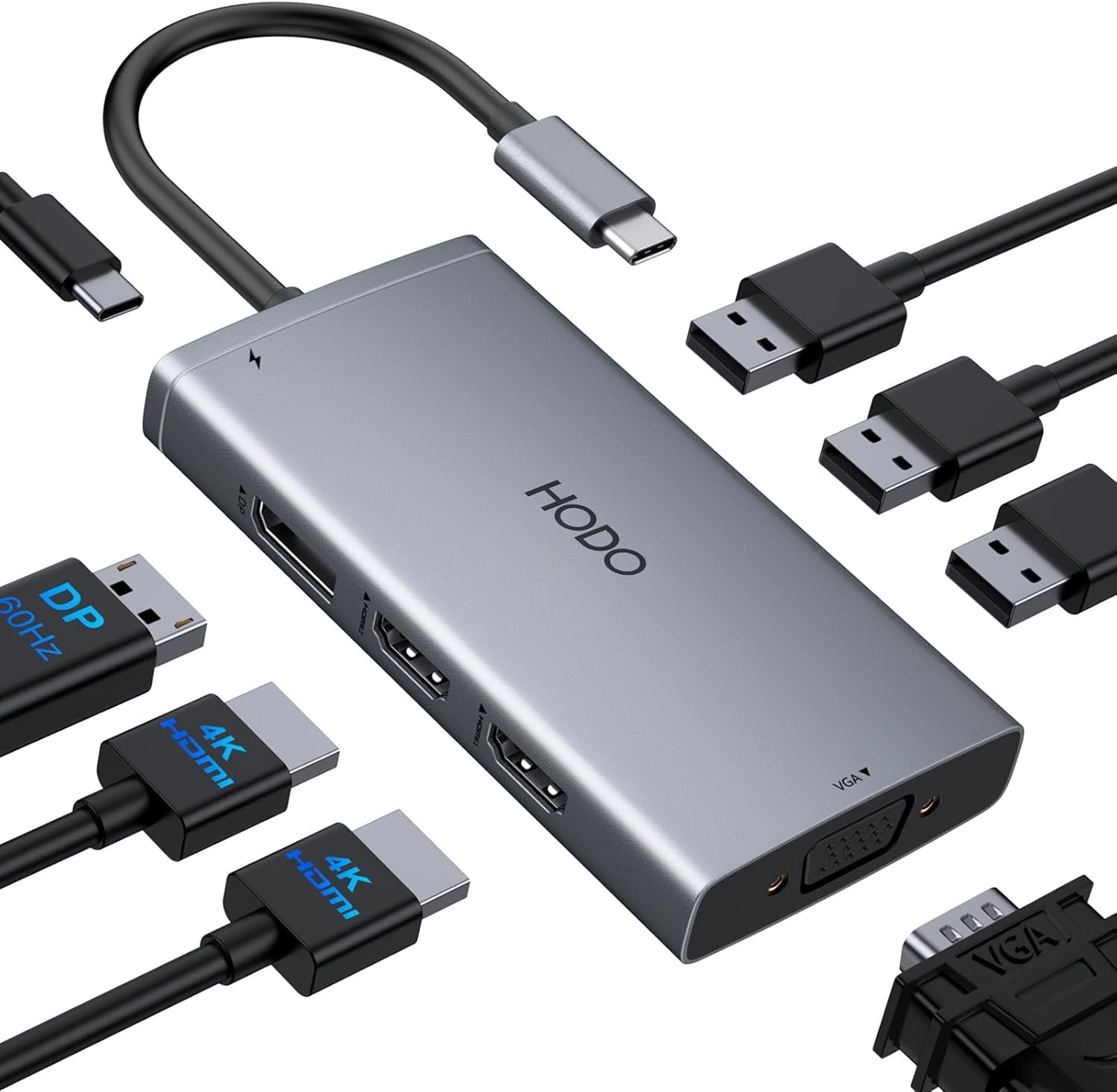
USB C Docking Station Dual Monitor Adapter for Dell HP, Laptop Docking Station 3 Monitors Quad Display USB C Hub Dongle to 4K HDMI+DP+VGA,3 USB2.0,100W PD,8 in 1 Thunderbolt Dock for Lenovo,Surface
From the brand

8-IN-1 USB C Docking Station
4K HDMI*2+VGA+DP+USB 2.0*3

HODO believes that professional products and enthusiatic after-sales support can provide customers with a better shopping experience.
Advance ChipsProfessional TeamOnline Support
What makes our products unique?
The technology and design team has more than ten years of experience in the field of usb c accessories. By studying various chip solutions, all usb c hubs use more stable chip and circuit design solutions, and bring professional products and services to customers
Are our products high quality?
The production of all usb c hubs is strictly controlled and inspected by a number of professional institutions, with a variety of certificates, such as: FCC CE ROHS etc.
HODO USB C Docking Station
HODO USB C Docking Station


USB C Docking Station 8 IN 1: HoDo USB C Docking Station with Dual HDMI 4K (1*60HZ & 1* 30HZ), 1*4K@60HZ DisplayPort, 1*1080P VGA,3* USB 2.0,USB C Power Charging Port (max 100W). Please Note: on MacOS system, the screens of external monitors are the same, no matter they are displayed in mirror mode or extended mode
Docking Station 4K Display Adapter: The Laptop Docking Station with 4 video output ports: 2 HDMI+DP+VGA, can output up to 4K Dual/Triple Display videos; For quadruple display Dual HDMI, DP, and VGA all are 1080@60Hz. Please make sure your laptop specification support DP1.4 signal output. If the VGA port is connected, it will affect the resolution of all displays up to 1080P only
100W USB C PD Charging Port: Computer Docking Station for Dell Hp laptop supports up to 100W input & 87W(safe)output into your laptop. Please Note: please ensure your laptop’s USB C port supports power delivery protocol and please use at least 65W power adapter(not included) when charging with this usb c hub,using a lower wattage power charger may cause a system warning. Note: The power cord is not included
USB C Hub Multiport Adapter: This USB C Dock with 3 usb 2.0 ports, allows your conveniently connect keyboard,mouse, usb flash driver, usb c hard disks, transfer speeds up to 480Mbps, USB 2.0 allows you to connect keyboard or mouse without any lag
Extensive Compatibility: This USB C Dongle Adapter specially designed for laptops with Full-featured USB Type-C port (support Display, charging, data transfer protocol), such as Dell XPS13/15/17, Dell latitude 5420/7420, Lenovo Thinkpad, Lenovo Yoga, HP Elitebook 840,HP envy, Surface pro 7 8, MacBook Pro/Air. If you experience any issues while using this USB C Hub, please reach out to us through the order page and we will solve the problem for you within 24 hours
Original price was: $159.99.$35.99Current price is: $35.99.
From the brand
8-IN-1 USB C Docking Station
4K HDMI*2+VGA+DP+USB 2.0*3
HODO believes that professional products and enthusiatic after-sales support can provide customers with a better shopping experience.
Advance ChipsProfessional TeamOnline Support
What makes our products unique?
The technology and design team has more than ten years of experience in the field of usb c accessories. By studying various chip solutions, all usb c hubs use more stable chip and circuit design solutions, and bring professional products and services to customers
Are our products high quality?
The production of all usb c hubs is strictly controlled and inspected by a number of professional institutions, with a variety of certificates, such as: FCC CE ROHS etc.
HODO USB C Docking Station
HODO USB C Docking Station
USB C Docking Station 8 IN 1: HoDo USB C Docking Station with Dual HDMI 4K (1*60HZ & 1* 30HZ), 1*4K@60HZ DisplayPort, 1*1080P VGA,3* USB 2.0,USB C Power Charging Port (max 100W). Please Note: on MacOS system, the screens of external monitors are the same, no matter they are displayed in mirror mode or extended mode
Docking Station 4K Display Adapter: The Laptop Docking Station with 4 video output ports: 2 HDMI+DP+VGA, can output up to 4K Dual/Triple Display videos; For quadruple display Dual HDMI, DP, and VGA all are 1080@60Hz. Please make sure your laptop specification support DP1.4 signal output. If the VGA port is connected, it will affect the resolution of all displays up to 1080P only
100W USB C PD Charging Port: Computer Docking Station for Dell Hp laptop supports up to 100W input & 87W(safe)output into your laptop. Please Note: please ensure your laptop’s USB C port supports power delivery protocol and please use at least 65W power adapter(not included) when charging with this usb c hub,using a lower wattage power charger may cause a system warning. Note: The power cord is not included
USB C Hub Multiport Adapter: This USB C Dock with 3 usb 2.0 ports, allows your conveniently connect keyboard,mouse, usb flash driver, usb c hard disks, transfer speeds up to 480Mbps, USB 2.0 allows you to connect keyboard or mouse without any lag
Extensive Compatibility: This USB C Dongle Adapter specially designed for laptops with Full-featured USB Type-C port (support Display, charging, data transfer protocol), such as Dell XPS13/15/17, Dell latitude 5420/7420, Lenovo Thinkpad, Lenovo Yoga, HP Elitebook 840,HP envy, Surface pro 7 8, MacBook Pro/Air. If you experience any issues while using this USB C Hub, please reach out to us through the order page and we will solve the problem for you within 24 hours
Specification: USB C Docking Station Dual Monitor Adapter for Dell HP, Laptop Docking Station 3 Monitors Quad Display USB C Hub Dongle to 4K HDMI+DP+VGA,3 USB2.0,100W PD,8 in 1 Thunderbolt Dock for Lenovo,Surface
|
13 reviews for USB C Docking Station Dual Monitor Adapter for Dell HP, Laptop Docking Station 3 Monitors Quad Display USB C Hub Dongle to 4K HDMI+DP+VGA,3 USB2.0,100W PD,8 in 1 Thunderbolt Dock for Lenovo,Surface
Add a review
Related Products




Original price was: $159.99.$35.99Current price is: $35.99.

LillyF –
Fantastic Docking Station for Multi-Monitor Power Users!
I’m really impressed with this USB-C Docking Station. It delivers exactly what it promises—smooth, reliable multi-monitor support without any hassle. I tested it with both a Dell and an HP laptop, and it handled triple-monitor output like a champ. The 4K HDMI and DP ports push out crisp, clean visuals, and even the VGA option works perfectly for older displays. Setup was effortless—plug-and-play with no weird driver issues. I also love that it includes 100W Power Delivery, which means one cable handles charging, displays, and peripherals. With 3 USB 2.0 ports, I can keep my mouse, keyboard, and backup drive connected without running out of space. Despite all its capabilities, it’s still compact enough to toss in a laptop bag. If you’re juggling multiple screens for work, design, or streaming, this docking station is excellent value and performance rolled into one.
Shanda –
So easy
Set up was so easy! I literally just plugged it into my computer, keyboard, mouse, and monitor and it worked! I adjusted the display settings to extend across the two monitors and it’s functional. I can unplug and go somewhere else with my laptop, come back, plug in and it goes right back to where I was.I’m also able to transfer between my work computer and my home computer quickly just by plugging into another computer. Working from home is now as comfortable and functional as working on site.I only hope that it lasts as some other reviews criticized the longevity of the docking station.
Jarrod J. Stringer –
Pretty good… (And was frustrating but customer service was phenomenal)
Updated review: customer service contacted me after my initial review and let me know that some laptops have a problem with wireless connections for the keyboard and mouse (an Intel issue). They gave me a full refund, which was extremely generous and appreciated. I have since plugged my USB for my wireless keyboard directly into the laptop and got a Bluetooth mouse to deal with the rest. Both are working great now. Have no problem with the monitors or camera being plugged into the docking station.Original review: Easy plug and play with my Dell laptop, but my wireless mouse and keyboard stutter quite a bit, and it’s very frustrating. I’m switching to a Bluetooth mouse to see if I can do that workaround.
A. Palla –
Great choice – works and looks good BUT you need a 100W charger to get 65W output
UPDATE: I still love it, it’s still beautiful, BUT in order to get the 65W output I need to boot up my laptop, I would need to have a 100W charger. It’s right on the box, and it may be in the description but if it is I missed it. I boot up directly from the charger and then run with this dock.*****************************************************It works just as well as docks that cost 3x a much. And the blush pink makes me happy and looks great on my very white desk. In case a manufacturer is reading this, a soft blue or green dock would look great on my desk, too.One of my monitors came with a VGA connection and I thought I’d ditch the converter and plug it into the dock directly. It works, but you’re back to a huge, analog screen. I hated it and couldn’t really work with multiple monitors when one of them was soooo different. Anyway, had I known this when I was shopping, I probably wouldn’t have selected one with a VGA slot (unless it was pink and didn’t cost more than the alternatives).
Cassi Rainier –
Great value, would definitely buy again
This mini docking station came in super handy with my Surface Pro which only has 2 USB-C ports. It allows me to plug in a wireless mouse, a keyboard w/number pad, and a second monitor screen.The quality is good, it doesn’t feel cheap and has stood up to some abuse when I throw it in my backpack. Definitely worth the price.
Gary Engle –
Great for the price!
This actually works I have a DELL i7. I connected an HDMI Display, Display port monitor, Keyboard/mouse, and Webcam. The DELL cam with an 85 watt power supply, it works fine to power the dock.
Wife_n_Mama_of_6 –
Choose a different brand
I think the ports take turns with malfunctioning. At first I could get the HDMI ports to work. I thought I was doing something wrong setting up my dual monitors. But then today the USB ports stopped working. All of them and the same time. So now I’m thinking, maybe the HDMI port wasn’t working and then started working for whatever reason. I just opted not to use them for a few weeks. There is no way of telling. I’ll just buy a different docking station. I’ll never buy this again. Brought this Dec 3 2025.
RBL –
Works as well or better than my HP thunderbolt dock at work
It works, just plug it into the thunderbolt port, plug your HDMI cables in and your monitors go into display settings to choose how you want your monitors to work
Petra –
Top, nimmt wenig Platz weg und alle Anschlüsse vorhanden, die gebraucht werden. Wie beschrieben
Franck Melka –
🖥️ 14 ports en 1 pour une productivité sans limite – Transformez votre port Thunderbolt 3 / USB-C en 2 HDMI 4K, 1 VGA 1080P, 3 USB 3.0, 2 USB 2.0, un lecteur SD/TF, un port Ethernet Gigabit, une prise audio 3,5 mm, un port USB-C PD 100W et un port USB-C données.📺 Double affichage HDMI & triple écran VGA – Profitez d’un double affichage en 4K ou d’une configuration triple écran. Plug & Play, sans logiciel requis. ⚠️ Note : MacOS ne supporte que le mode miroir (pas de triple affichage).🌐 Connexion réseau ultra-rapide & audio 3,5 mm – Accédez à un réseau Gigabit Ethernet stable (10/100/1000 Mbps) et connectez votre casque filaire pour une immersion totale sans déranger votre entourage.⚡ Charge rapide USB-C PD 100W – Fournit jusqu’à 85W à votre ordinateur portable, assurant une alimentation optimale tout en utilisant d’autres périphériques (⚠️ Alimentation et câble non inclus).🚀 Transfert de données haute vitesse – USB 3.0 (5 Gbps) et USB-C permettent un transfert ultra-rapide pour disques durs, smartphones, tablettes. Ports USB 2.0 dédiés aux périphériques à faible latence comme un clavier ou une souris.📸 Lecteur SD/TF idéal pour créateurs – Transférez photos et vidéos rapidement (104 Mbps), parfait pour photographes, vidéastes et designers.Une station d’accueil polyvalente et puissante, parfaite pour MacBook, Windows et tous vos besoins en connectivité ! 🚀🔌💻
Patrick –
Ich verwende den HODO 9-in-1 USB-C Hub sowohl am MacBook als auch am iPad – und bin mehr als zufrieden! Die Verbindung ist stabil, die Verarbeitung hochwertig, und alle Funktionen laufen reibungslos. Der HDMI-Port liefert gestochen scharfe Qualität , ideal für Präsentationen oder Streaming. Ob SD-/TF-Kartenleser oder USB-Ports, alles wird sofort erkannt und funktioniert wie gewünscht.Das Laden ist ein echtes Highlight, besonders bei längerer Nutzung. Auch am iPad ist der Adapter voll kompatibel und ermöglicht komfortables Arbeiten mit externen Monitoren, USB-Sticks oder Speicherkarten, super praktisch fürs Homeoffice oder unterwegs.Ein rundum durchdachtes Gerät, das für kreative, mobile und produktive Nutzung gleichermaßen punktet. Ich kann den USB-C HUB nur empfehlen.
Adrian –
Ich bin von diesem USB-C Hub wirklich positiv überrascht. Die Verarbeitung wirkt hochwertig und das Gehäuse macht einen sehr stabilen Eindruck. Alle Anschlüsse funktionieren problemlos und lassen sich einfach nutzen.Was mich besonders positiv überrascht hat: Der Hub sitzt sehr stabil und wackelt überhaupt nicht, was ich bei solchen Adaptern zuerst befürchtet hatte. Gerade am MacBook passt er wirklich gut.Insgesamt ein sehr praktischer Hub mit guter Qualität – ich bin bisher sehr zufrieden und kann ihn definitiv weiterempfehlen.
Parthénon –
Ce hub apporte à mon MacBook M1 exactement tout ce qui lui manquait : un port ethernet vraiment Gigabit (j’ai relevé une vitesse descendante de 931MB/s), un renvoi d’alimentation USB-C, un port USB-C et 4 USB-A, 1 port HDMI et un lecteur de cartes SD/Micro SD. Il y a même une petite led qui s’allume lorsqu’il est en fonction. Les vitesses de transfert sont au rendez-vous et l’appareil est très compact. Il m’accompagne partout dans la sacoche de mon MacBook.