


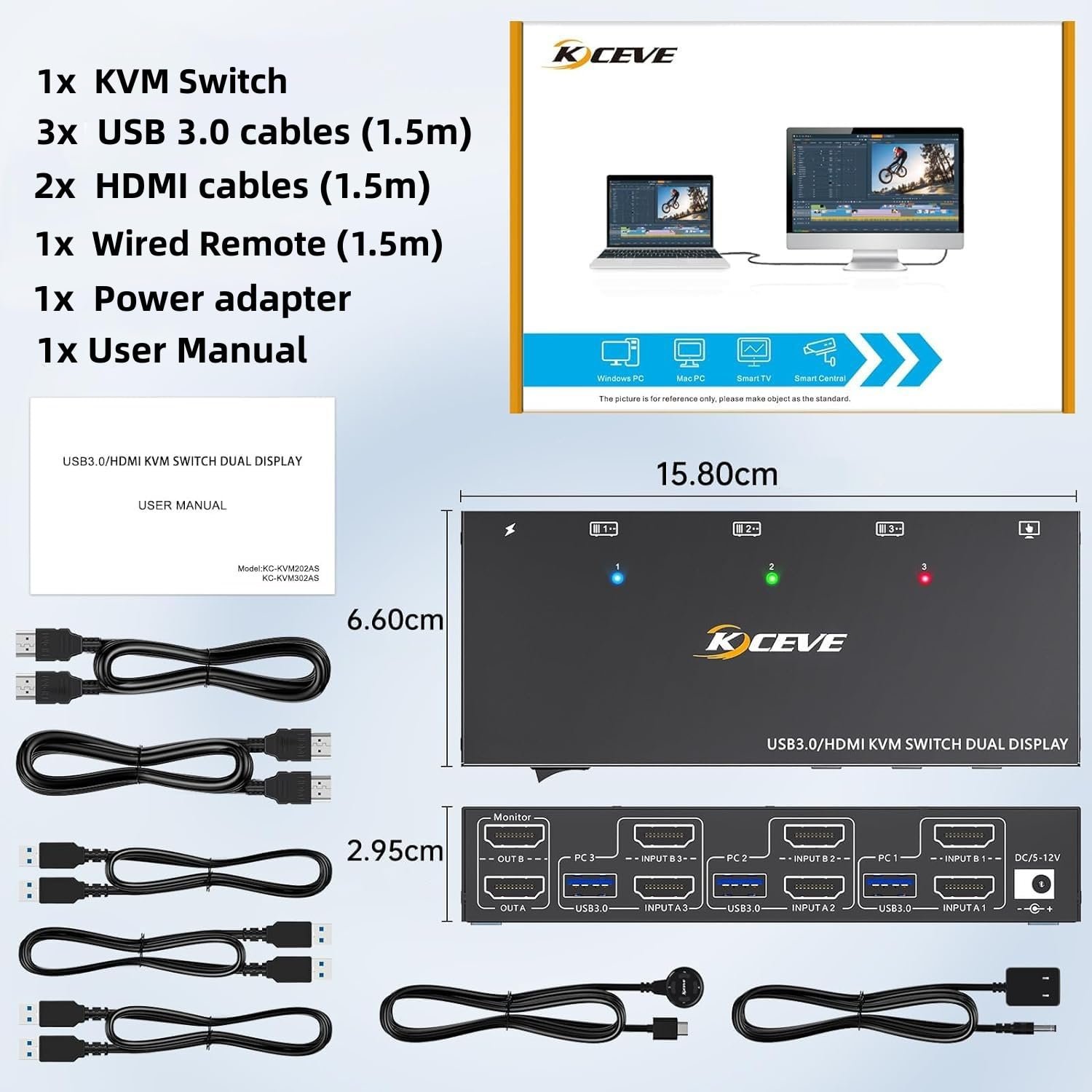


3 Computers 2 Monitors KVM Switch, Reyoten HDMI2.1 KVM Support 4K@60Hz 2K@144Hz USB 3.0 KVM Switches Share 2 Monitors and 4 USB 3.0 Ports, Support EDID Emulator【HDMI Port Only】
Product description

2 Monitor KVM Switch for 3 Computer and 2 Monitors
Product name: HDMI KVM Switch for 3 computer 2 monitorsMaterial: Metal shellControl way: physical button and wired controlKeyboard hotkey switch way: Not supportedResolution range: Up to 4K@60HzSupport wired or wireless keyboard and mouseSupports EDID emulator, keep windows information in the same place.Supports HDMI 2.0 HDCP 2.2, HDR10
If the kvm switch is not working, please follow the steps below totroubleshoot the problem:
1. lf you want to run 4K resolution, please make sure the HDMl cable supports 4K.Please plug in the USB cables or power adapter to provide enough power. Otherwise keyboard and mouse will not work.The extended display function is not available for Mac M1 and M2.

Easy set up for HDMI devices, 2 HDMI ports are requird for your each computer
Each computer needs 2 HDMI ports, please make sure your computer with 2 HDMI ports before purchasing.This USB 3.0 version dual monitor KVM switch is for 3 computers share 2 monitors, keyboard, mouse and USB devices. Please connect all cables to make 2 display work properly.Two HDMI inputs used for HDMI devices, such as computer, laptop, TV box, DVD, PS5/4, etc. Please note if PS console connected, the mouse and keyboard con’t control the game via KVM switch.Upgraded USB 3.0 version ensure data transfer more faster and stable, it’s a great solution to solve many USB device disconnected issue during use.Power suppy is not required for normal USB device, but if USB recognition is unstable, we recommend connect a external power adapter to provide enough power. USB 3.0 cables must be connected, otherwise keyboard and mouse will not work.Bluetooth mouse and keyboard will be exist delay for few seconds, we not recommend use Bluetooth mouse and keyboard.

Plug and play
No additional driver software required.This dual monitor KVM switch supports various input devices such as PC, Laptop, PS4, etc.

Support 2 switching ways
Physical button control, fast and convenient switching way.Wired control, you can hide the kvm switch under the table and keep the desk tidy.

USB 3.0 KVM Switch with EDID emulators in each input port
USB 3.0 KVM Switch with EDID emulators in each input port, keep computers always having correct display information when switch back.For most KVM switch on the market are not support EDID locking sreen function, it’s not very convenient sometimes.

USB 3.0 transmission up to 5Gbps
USB 3.0 technology supports a transfer speed of up to 5 Gbit/s, USB 2.0 can only provide a transfer speed of 480 Mbit/s

Enjoy HD quality display, support follow resolution
SUPPORT: 4K x 2K (3840x 2160@ 60Hz); 4K x 2K (2560x 1600@ 60Hz); 4K x 2K (2048x 1536@ 60Hz); 2560×1440 @ 60hz; 1920×1440 @ 60hz; 1920×1200 @ 60h

4 USB 3.0 ports
The additional USB port allows the two systems to share printers, USB flash drives and other devices.

Compatible with most systems
It is compatible with a variety of operating systems including Windows 7/8/10/11/Vista/XP, Linux, Mac, andmore.

DC5V port for power supply
Normally a DC5V power supply is not needed unless the USB device connection is unstable.

KVM Switch PACKING LIST
1 x Dual Monitor KVM Switch2 x HDMI cable 1.5m3 x USB 3.0 cables 1.5m1 x DC 12V power supply1 x remote control 1.5 m1 x User Manual
【3 computers 2 monitors KVM Switch 】This 2-monitor KVM switch allow you to control 3 computers( or laptops) by only one set of wired or wireless keyboard mouse, share 4 USB 3.0 devices and 2 monitors. It is widely applied for office, multimedia teaching, meeting room, etc.
【Ultra HD 4K@60Hz/2K@144Hz 】USB 3.0 Dual Monitor KVM switch HDMI support resolution 𝟒𝐊@𝟔𝟎𝐇𝐳,𝟐𝐊@𝟏𝟐𝟎𝐇𝐳,@𝟏𝟒𝟒𝐇𝐳. 3 computers 2 monitors switch aslo support input terminal to connect 2 computers with different resolutions, e.g. one is 4K@60Hz, the other is 4K@30Hz, 1440P@60Hz, 3D,1080P@60Hz or lower resolution. Note: please use HDMI 2.0 cable ( cable length not exceed 1.5m) if your device output 4K resolution, and make sure your computers and monitors are all support 4K also.
【HDMI KVM Switch with 4 USB 3.0 Ports】USB 3.0 KVM switches come with 4 USB 3.0 ports for sharing USB devices, such as mouse, keybaord, scanners, printers, U disks and other USB devices, USB 3.0 version ensure data transfer more faster and stable, it’s a great solution to solve many USB device disconnected issue during use.
【Dual monitor kvm Switch Support 2 Switching Mode】HDMI KVM switch dual monitor support physical button and wired control. You can press the button on the panel or use the wired remote to switch the computers. LED light indicates which computer is active. Note: Keyboard short cuts (hotkeys) switch way not supported.
【Two display modes】KVM switch dual monitor hdmi support extend display mode or copy display mode, when in “mirror” mode the main screen can be copied to the second screen output two identical screen. When in “Extend” mode, the window from the main screen can be dragged to the second screen output two different screens.
EDID Emulator Ensures Stable Display Without Resolution Loss or Black Screen】Built-in advanced EDID (Extended Display Identification Data) emulator, this KVM switch automatically stores and emulates the display parameters of your monitor (such as resolution, refresh rate, color depth). Say goodbye to common issues like screen flickering, black screen, resolution downgrade, or “no signal” prompts when switching between 3 computers – ideal for gaming, design, and office scenarios that require high-precision display.
Original price was: $69.99.$59.99Current price is: $59.99.
Product description
2 Monitor KVM Switch for 3 Computer and 2 Monitors
Product name: HDMI KVM Switch for 3 computer 2 monitorsMaterial: Metal shellControl way: physical button and wired controlKeyboard hotkey switch way: Not supportedResolution range: Up to 4K@60HzSupport wired or wireless keyboard and mouseSupports EDID emulator, keep windows information in the same place.Supports HDMI 2.0 HDCP 2.2, HDR10
If the kvm switch is not working, please follow the steps below totroubleshoot the problem:
1. lf you want to run 4K resolution, please make sure the HDMl cable supports 4K.Please plug in the USB cables or power adapter to provide enough power. Otherwise keyboard and mouse will not work.The extended display function is not available for Mac M1 and M2.
Easy set up for HDMI devices, 2 HDMI ports are requird for your each computer
Each computer needs 2 HDMI ports, please make sure your computer with 2 HDMI ports before purchasing.This USB 3.0 version dual monitor KVM switch is for 3 computers share 2 monitors, keyboard, mouse and USB devices. Please connect all cables to make 2 display work properly.Two HDMI inputs used for HDMI devices, such as computer, laptop, TV box, DVD, PS5/4, etc. Please note if PS console connected, the mouse and keyboard con’t control the game via KVM switch.Upgraded USB 3.0 version ensure data transfer more faster and stable, it’s a great solution to solve many USB device disconnected issue during use.Power suppy is not required for normal USB device, but if USB recognition is unstable, we recommend connect a external power adapter to provide enough power. USB 3.0 cables must be connected, otherwise keyboard and mouse will not work.Bluetooth mouse and keyboard will be exist delay for few seconds, we not recommend use Bluetooth mouse and keyboard.
Plug and play
No additional driver software required.This dual monitor KVM switch supports various input devices such as PC, Laptop, PS4, etc.
Support 2 switching ways
Physical button control, fast and convenient switching way.Wired control, you can hide the kvm switch under the table and keep the desk tidy.
USB 3.0 KVM Switch with EDID emulators in each input port
USB 3.0 KVM Switch with EDID emulators in each input port, keep computers always having correct display information when switch back.For most KVM switch on the market are not support EDID locking sreen function, it’s not very convenient sometimes.
USB 3.0 transmission up to 5Gbps
USB 3.0 technology supports a transfer speed of up to 5 Gbit/s, USB 2.0 can only provide a transfer speed of 480 Mbit/s
Enjoy HD quality display, support follow resolution
SUPPORT: 4K x 2K (3840x 2160@ 60Hz); 4K x 2K (2560x 1600@ 60Hz); 4K x 2K (2048x 1536@ 60Hz); 2560×1440 @ 60hz; 1920×1440 @ 60hz; 1920×1200 @ 60h
4 USB 3.0 ports
The additional USB port allows the two systems to share printers, USB flash drives and other devices.
Compatible with most systems
It is compatible with a variety of operating systems including Windows 7/8/10/11/Vista/XP, Linux, Mac, andmore.
DC5V port for power supply
Normally a DC5V power supply is not needed unless the USB device connection is unstable.
KVM Switch PACKING LIST
1 x Dual Monitor KVM Switch2 x HDMI cable 1.5m3 x USB 3.0 cables 1.5m1 x DC 12V power supply1 x remote control 1.5 m1 x User Manual
【3 computers 2 monitors KVM Switch 】This 2-monitor KVM switch allow you to control 3 computers( or laptops) by only one set of wired or wireless keyboard mouse, share 4 USB 3.0 devices and 2 monitors. It is widely applied for office, multimedia teaching, meeting room, etc.
【Ultra HD 4K@60Hz/2K@144Hz 】USB 3.0 Dual Monitor KVM switch HDMI support resolution 𝟒𝐊@𝟔𝟎𝐇𝐳,𝟐𝐊@𝟏𝟐𝟎𝐇𝐳,@𝟏𝟒𝟒𝐇𝐳. 3 computers 2 monitors switch aslo support input terminal to connect 2 computers with different resolutions, e.g. one is 4K@60Hz, the other is 4K@30Hz, 1440P@60Hz, 3D,1080P@60Hz or lower resolution. Note: please use HDMI 2.0 cable ( cable length not exceed 1.5m) if your device output 4K resolution, and make sure your computers and monitors are all support 4K also.
【HDMI KVM Switch with 4 USB 3.0 Ports】USB 3.0 KVM switches come with 4 USB 3.0 ports for sharing USB devices, such as mouse, keybaord, scanners, printers, U disks and other USB devices, USB 3.0 version ensure data transfer more faster and stable, it’s a great solution to solve many USB device disconnected issue during use.
【Dual monitor kvm Switch Support 2 Switching Mode】HDMI KVM switch dual monitor support physical button and wired control. You can press the button on the panel or use the wired remote to switch the computers. LED light indicates which computer is active. Note: Keyboard short cuts (hotkeys) switch way not supported.
【Two display modes】KVM switch dual monitor hdmi support extend display mode or copy display mode, when in “mirror” mode the main screen can be copied to the second screen output two identical screen. When in “Extend” mode, the window from the main screen can be dragged to the second screen output two different screens.
EDID Emulator Ensures Stable Display Without Resolution Loss or Black Screen】Built-in advanced EDID (Extended Display Identification Data) emulator, this KVM switch automatically stores and emulates the display parameters of your monitor (such as resolution, refresh rate, color depth). Say goodbye to common issues like screen flickering, black screen, resolution downgrade, or “no signal” prompts when switching between 3 computers – ideal for gaming, design, and office scenarios that require high-precision display.
Specification: 3 Computers 2 Monitors KVM Switch, Reyoten HDMI2.1 KVM Support 4K@60Hz 2K@144Hz USB 3.0 KVM Switches Share 2 Monitors and 4 USB 3.0 Ports, Support EDID Emulator【HDMI Port Only】
|
8 reviews for 3 Computers 2 Monitors KVM Switch, Reyoten HDMI2.1 KVM Support 4K@60Hz 2K@144Hz USB 3.0 KVM Switches Share 2 Monitors and 4 USB 3.0 Ports, Support EDID Emulator【HDMI Port Only】
Add a review
Related Products




Original price was: $69.99.$59.99Current price is: $59.99.

KaninAngMandaragat –
The Perfect Solution for 2 Laptops and a Desktop
I have an HP work laptop, my personal MacBook Pro, and an old Dell Optiplex 780 tower. This switch flows flawlessly through the three of them. Switching my dual monitors, CAC-enabled keyboard, optical mouse, and printer without missing a beat. I’m in love with it. The hardest part was finding enough cables at the correct lengths to get everyone connected. Plan for that so you don’t spoil the fun on setup day. Works as if it were an expensive name brand, without the hefty price tag. Simple plug-and-play with high-quality video resolution. Switches over in seconds as long as the machine you’re switching to is awake. I mounted it under my desk and organized the cord spaghetti there, so all I have to look at is the handy remote button that has a good length of cable.
Michael A. Berzinis II –
does not easily support dual monitors.
I was not able to get a pc (with 1 hdmi and 1 usb input) to show on dual monitors like the description claims. Will be returning item.
Bukansa –
Working out well.
I purchased this so I could get some work tasks completed at home. As a business owner, I spend WAAAYY TOOOO MUCH time at the office. My husband has it set up so we can switch between his computer & mine. So far it’s working out well.
Nicholas T. –
Great KVM Switch for Multiple Computers
This KVM switch has been a game-changer for my home office setup. I can now seamlessly switch between my work laptop, personal PC, and gaming rig without the hassle of unplugging and reconnecting everything. The 4K@60Hz support is fantastic – no degradation in image quality across my dual monitors. The extended/copy mode options give me flexibility depending on my workflow needs. USB 3.0 ports are fast and reliable for all my peripherals. The wired controller makes switching between computers super convenient – just press a button and everything (monitors, keyboard, mouse) switches instantly. Last week during a critical work presentation, I needed to quickly access files on my personal computer, and the switch made it happen in seconds without any disruption. Definitely worth the investment if you’re managing multiple computers.
haybou –
hdmi kvm
It works. But i need more. USB 3.0. Ports
Relayer –
Home Computer, Work Computer, and Steam Deck… at the push of a button!
I upgraded a two-computer KVM with this. I don’t have dual monitors (yet), so I cannot report on how dual-monitor switching works. But as a conventional single-monitor KVM, it works flawlessly.Like most KVM devices, this has all the cables you need to get started. In fact, it may have a bit more. I don’t recall other KVMs that I used coming with more than one HDMI cable. This came with all that I needed. Cabling is simple, too. Just run both the HDMI and USB cable from your device to one of the three Computer inputs, and any item on its USB inputs will be available to it when that computer is switched in.I currently have my home computer, my work laptop (via docking station), and my Steam Deck (also via docking station) connected to it. I can easily switch between all three using the buttons on the KVM housing or the buttons on the cabled remote.I also have more than four USB devices I prefer to use when computing, so I was glad to see that the KVM was friendly with an 8-port USB hub connected to it, and the USB hub built into my connected monitor. Other KVM devices I tried had issues with daisy-chained USB connections. This one seems to be working quite well.As for video handling, I tend to run 4K @ 60Hz. This handles that resolution and rate just fine. When I use my Steam Deck, my mouse, keyboard, and flight yoke controller operate without issue.I wish it could be powered solely off of a USB 3.0 port, for convenience, but it comes with a 12v plug-in power adapter that requires a wall outlet. I understand why it needs direct power like this. There is a lot that goes on inside the product case. More reliable power will help it operate fully.In all, I like the KVM. It sits and does what it’s supposed to do diligently. No complaints.
Sonjia Rodriguez –
Easy set up, functionality not ideal
Not sure if I received a defective switch, but it did not toggle between systems nor did the dual monitors work.
Tangerine Peel Peanuts –
Very Good value for essentially 2 separate 3 HDMI + 4 USB A KVM switches
I was in the market for a KVM switch so I could reduce wear and tear on my devices’ usb ports whenever I switch from work on my monitor to play on my TV. I wanted an integrated switch for both HDMI video and peripherals (PS5, streaming devices, PS5 headset which requires its own wireless dongle in a usb A port, and ps5 controller). This switch worked great, though there were some caveats and nitpicks. This lets me share 4 usb ports between 3 devices by using HDMI for video and USB A for accessories, and output into 2 different monitors, (different input signals though), essentially serving as 2 KVM switches in one. See pics for details.I like that it has dedicated buttons for each input on top instead of cycling thru them 1 by 1, and also a wired ‘remote’ with the same buttons for better reach if you want to tuck the switch somewhere. This way, even if one set of buttons fail, you have a back-up. Build quality is quite nice as well, having a metal shell instead of cheap plastic. Unlike other switches, this guy is heavy enough to stay put, even with the drag from all the cables, though it does benefit from adding rubber pads. It also needs a separate 5Vdc power adapter, which is different from other kvm switches that just use the hdmi port. I feel that’s fair since it’s balancing more signals and essentially 2 in 1.However, This switch does not work w/ USB A to USB C cables for connecting to computers, that’s why I have a Sabrent USB C hub providing the USB A port for the switch. Just to be clear, the connection from the switch to the computer has to be USB A to USB A on the back, not the inputs. .Overall, I think this is good value @$71 as of time of review, since this is basically 2 separate 3 HDMI + 4 USB A KVM switches that happen to be in the same case (technically the usb A ports are shared b/t both, but still). Purchased separately, that would be $100.